
Android guide
How to print Android text messages for court
Create a PDF of your Android conversations, check the message details, then print or share it with your lawyer. Standard PDF export and printing are free, and you can do both from your phone without a computer. The steps below use SMS Backup.
Quick answer: Select your conversations, choose PDF or Legal export, set a date range if needed, and tap Start export. Open the resulting PDF to review it, then use Print or Share.
Standard PDF export is free. Legal export, described in the app as “Court-ready PDF,” adds a cover sheet, sender details, full timestamps and numbered pages with Premium. Premium is a one-time purchase; see current pricing on the homepage.
Before you start
You need the Android phone that contains the messages and SMS Backup installed. Allow the message access requested during setup, then check that the conversation you want appears in the app before purchasing Premium.
SMS and MMS export depends on the messages accessible on your device. RCS availability varies by phone and messaging setup. The app cannot recover messages deleted before the export, and this guide does not cover iPhone or WhatsApp conversations.
Check your court’s rules first
Each court, and sometimes each courtroom, sets its own rules for exhibits, and they differ more than you might expect. Two California examples:
- Placer County Superior Court’s guide for restraining order hearings (October 2024) says the court will not look at evidence on your phone. Text messages must be brought in a form, such as printed out, that can be marked as an exhibit and left with the court. It asks for four copies, and the other party gets theirs before the hearing.
- One Fresno County courtroom’s exhibit rules for eviction trials (October 2021) ask for three sets of copies, and ask you not to number or otherwise mark the pages.
Before you export, find out from your court’s instructions or your lawyer:
- what form exhibits must take, and whether messages on a phone are accepted;
- how many copies to bring, and when and how to give them to the court and the other party, including for a remote hearing;
- whether pages may carry page numbers or other markings;
- how messages are shown to be genuine.
That last point matters because a well-formatted PDF does not prove who wrote a message. Under rules such as Federal Rule of Evidence 901, the party offering evidence shows it is what they say it is, for example through testimony of someone who knows, or through details in the messages themselves. That is the federal rule; state courts have their own versions.
Whatever the rules, it helps to export the messages around the ones that matter, so they can be read in context, with who sent each message and when. Legal export prints the sender and time on every message. The free PDF dates groups of messages, not each one.
Step 1
Select the conversations you need
Open Conversations and select the thread you want to export. You can select more than one. Tap Export selected; the number in parentheses shows how many conversations you selected.
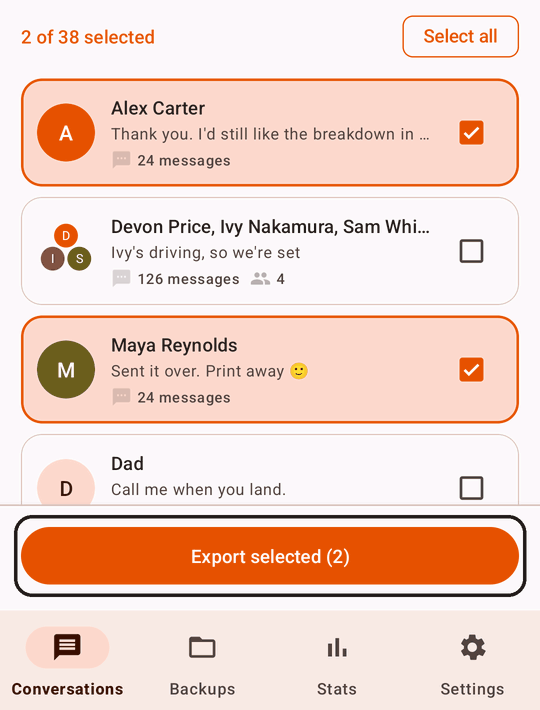
The Export conversations sheet lets you choose the format and options for those conversations. Check the selection count before continuing, especially if you only need one thread.
Step 2
Choose PDF or Legal export
Choose PDF for a readable conversation document you can print or share, at no cost. Choose Legal export when you want the additional document details shown in the court-ready sample; it is part of Premium.
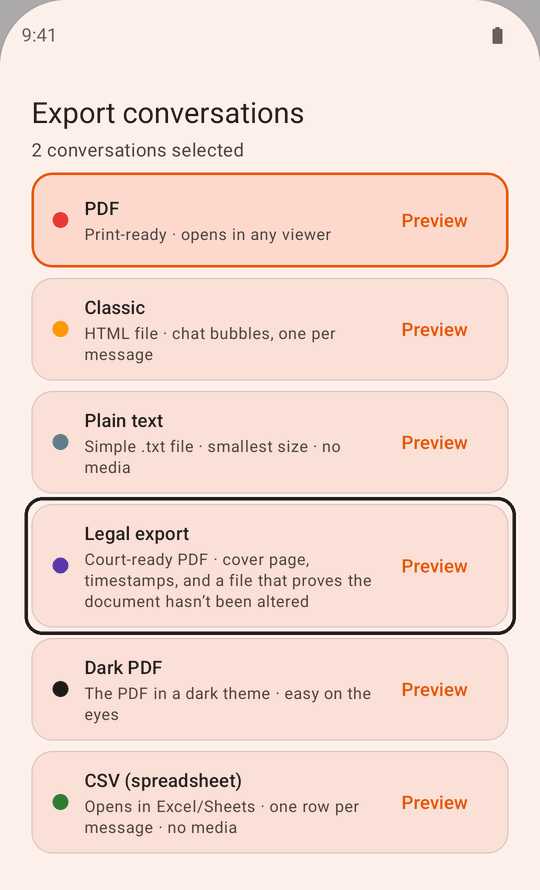
| Option in the app | Best fit | Cost |
|---|---|---|
| A readable conversation PDF for saving, sharing or printing | Free | |
| Legal export | Adds a cover sheet, per-message sender details and timestamps, page numbering, optional Bates identifiers and a SHA-256 verification file | Premium, one-time purchase |
If you choose Legal export and do not have Premium, the app will prompt you to upgrade. You do not need Premium just to print a standard PDF.
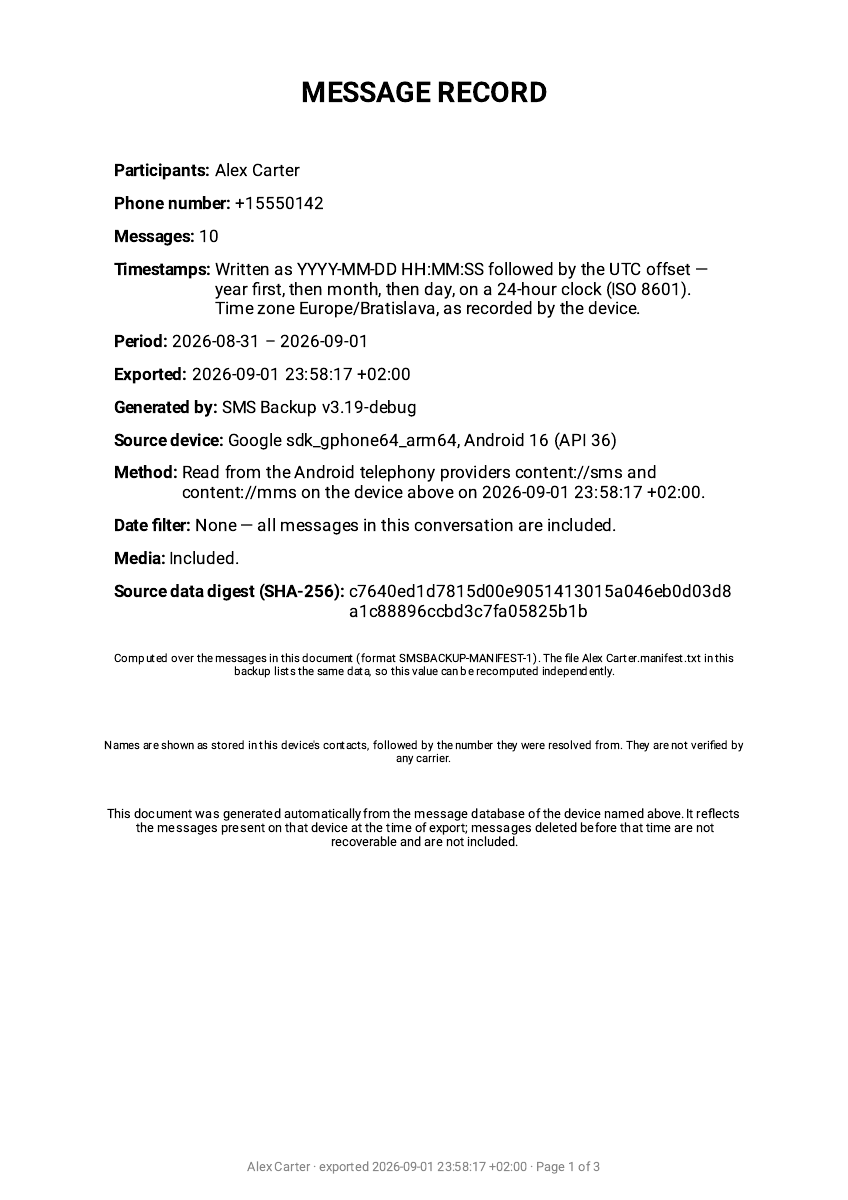
Cover sheet
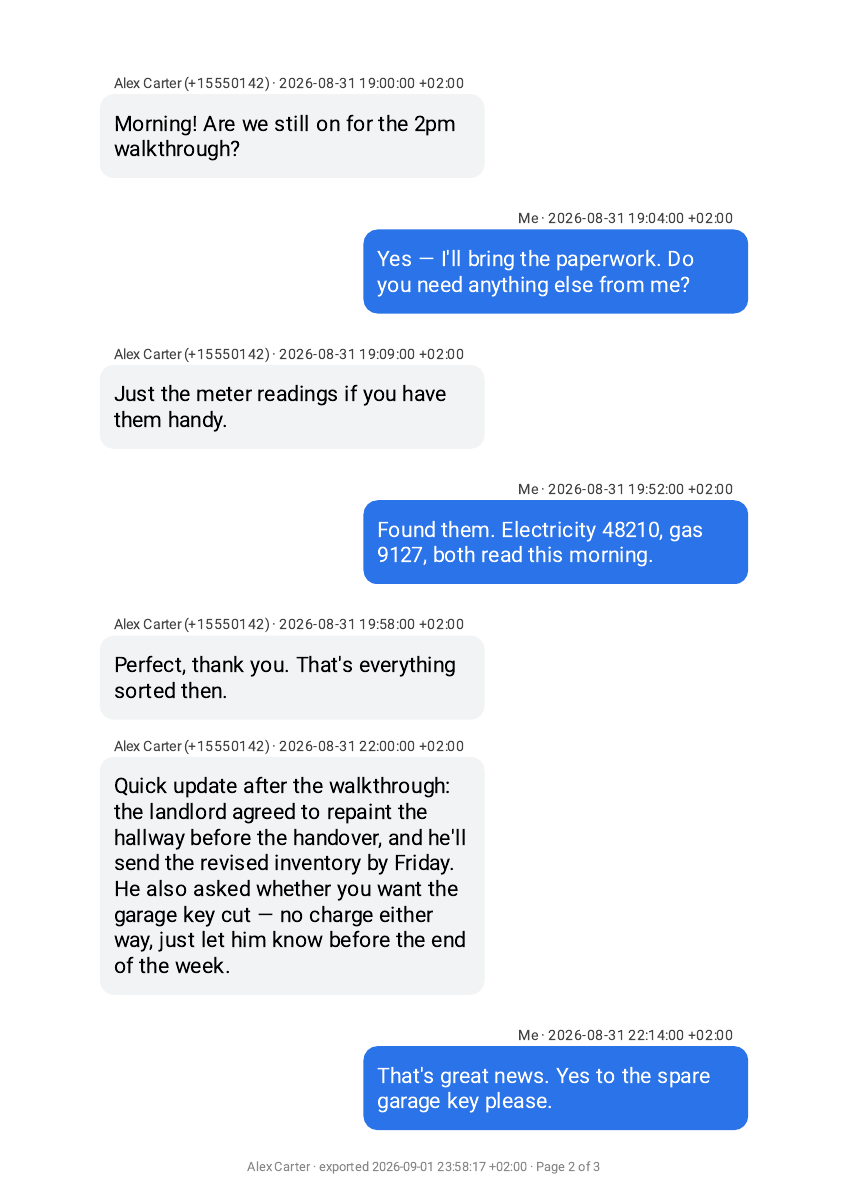
Message pages
Step 3
Set the date range and export details
Tap Date range to choose the period you want to include. Leave All messages selected to export the full available conversation, or use Reset to all messages to clear a filter. Date filtering is available with the free PDF option too.
Choose a period that includes the surrounding conversation you need to review. After exporting, check that the first and last messages match the period you intended.
With Legal export selected, Export details lets you optionally add a Case or matter reference, Custodian name, Custodian phone number and Bates prefix, and append a certification page. The custodian is the person whose phone the messages came from. The app prints these details as entered; it does not verify them. Leave fields blank if you do not need them or do not know what to enter.
About Bates numbering and certification
A Bates prefix numbers the pages for a production: enter REYES- and each page footer carries REYES-000001, REYES-000002 and so on, alongside the conversation name and the export time. That way a single page still identifies itself after it has been separated from the rest of the document. The Bates prefix is optional, but Legal export always prints page numbers. If your court asks for pages without numbers or markings, ask the court or your lawyer which version to submit; the free PDF has no page numbers.
Export details also offers a certification page. When enabled, the export ends with a blank declaration under 28 U.S.C. § 1746 for a person to complete and sign. It ships blank on purpose: everything on it is the statement of whoever signs it, not of the app, which cannot know whether an export is true and correct. Leave it off if your filing does not need one.
If you also need the original photos, videos or audio files, review Include attachment files, a Premium option. A printed PDF cannot play video or audio, so check the exported files as well as the document when those attachments matter.
Step 4
Export and review the PDF
Tap Start export and wait for Export complete. Read any notice about skipped messages before using the result.
Open Backups, select the export you just created, and open the conversation’s PDF. Review the sender information, timestamps, date range and page sequence. Check any attachment notes and confirm that the messages you expected are present.
The Share action in the completion dialog shares the backup ZIP. To send just the PDF, open that PDF first and use Share in its viewer.
Check a PDF and its verification file
Show the commands
Alongside each Legal export document, the app writes a manifest file named <document>.manifest.txt. It records a SHA-256 of the PDF’s bytes and a digest of the message data, and prints the commands to recompute both:
grep -v '^#' 'Alex Carter.manifest.txt' | shasum -a 256
shasum -a 256 'Alex Carter.pdf'
The first should equal the digest printed on the cover sheet, and the second should equal the PDF hash recorded in the manifest. The PDF command checks whether those PDF bytes match the original verification file; the manifest command checks whether its recorded message-data digest matches the cover sheet. Neither check authenticates the messages. Keep an unchanged original manifest: replacing both the PDF and manifest can create a new matching pair.
Editing or digitally filling the PDF changes its hash. Keep the original export and manifest if you make an edited copy.
These commands are written for macOS. On Linux, use sha256sum in place of shasum -a 256; the same pipeline works with sha256sum.
On Windows, certutil -hashfile "Alex Carter.pdf" SHA256 gives the document hash. It cannot run the first command: it hashes the whole manifest, # comments included, so it returns a different value. That does not mean anything is wrong with the document. To run the commands above as written, use Git Bash or WSL.
Keep the quotation marks: documents are named after the conversation, so the file name usually contains a space, and without quotes the shell reads it as two files.
You can try both commands on the sample PDF and its manifest. Both save under the names the commands use.
Step 5
Print it, or send it to your lawyer
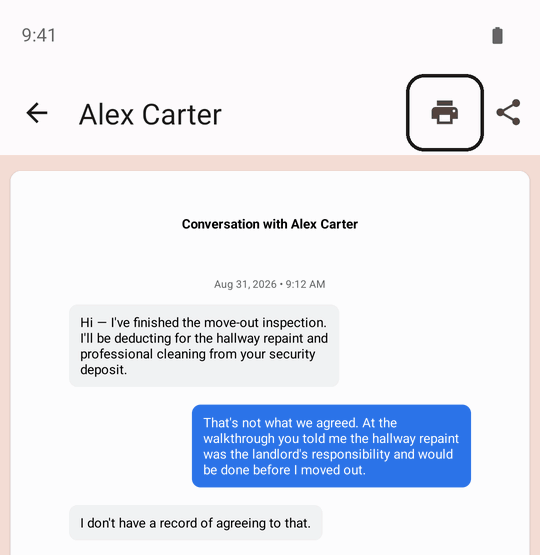
With the PDF open in the app’s viewer, choose Print. Android’s print dialog lets you select a printer and adjust settings such as paper size and page range. Check the preview before printing.
Setting up a printer, printing without one and what to check in the preview are covered in how to print text messages from Android.
Sending the messages to your lawyer
- Send the PDF itself. Use Share in the PDF viewer to email it or save it to Google Drive. A PDF keeps every page and stays searchable; screenshots of it do not.
- Include the verification file. With Legal export, sharing the PDF does not include its
.manifest.txtverification file. In Backups, open the export and tap ⋮ next to the.manifest.txtfile, then Share or Save to…. Keep both originals unchanged yourself. - Keep a copy outside the app. Exports are stored inside the app, and Android deletes an app’s files when it is uninstalled. In Backups, open the export, tap ⋮ next to a file and choose Save to… to keep it in your phone’s files or in Google Drive.
- Keep the original messages. Do not delete the conversation after exporting it. Your lawyer may want the phone or the messages themselves later.
Questions about exporting and printing messages
Can I export only one conversation?
Yes. Select only that thread in Conversations, then tap Export selected.
Why are some messages missing?
First check the conversation selection and date filter. If the messages do not appear in the app at all, they may not be accessible through your phone’s message storage. On Android 16 and newer, encrypted chats in Google Messages are hidden from every app except your default texting app, which can leave out a whole conversation or one side of it; see why messages go missing, and how to include them. Messages already deleted from the device cannot be recovered by exporting.
Why is there no Print option?
Either the PDF has not opened yet or the device has no Android printing support: Print appears once a PDF opens successfully on a device that supports it. If it is unavailable, use Share to open the PDF in another viewer or move it to a computer with a printer.
Can I print only part of a conversation?
Yes, with Date range in step 3. Include the messages before and after the ones that matter, though: a court or the other side may want the context.
Can I export a group text?
Yes, like any other conversation. In Legal export, every message shows who sent it and when. Your own messages show the name and number you enter as the custodian in Export details, or “Me” if you leave them blank. The app does not fill these in for you.
Will the other person know I exported our messages?
No. The export is created on your phone, and nothing is sent to the other person. SMS Backup never receives your message content either.
Where is the PDF saved?
Inside the app, under Backups, and it is deleted if you uninstall the app. Step 5 shows how to keep a copy elsewhere.
What if I already deleted some messages?
An export copies only what is still on the phone. A PDF or screenshot you saved before deleting them can still be printed. An earlier backup may be another source, though it may have to be restored to a phone and exported again first. Ask your lawyer about other ways to get the messages, such as the other person’s copy.
Does a court-ready PDF prove who sent the messages?
No. The PDF organizes the message data available to the app; its formatting cannot independently establish who authored a message, and it does not guarantee court acceptance. Check the requirements for your case before submitting it.
The SHA-256 verification file supports a narrower check. Compare the PDF’s hash with the value in the unchanged original verification file: a match confirms that the copy is byte-for-byte the PDF the app exported, so it was not edited afterwards. It does not show who wrote the messages, or that the messages on the phone were never changed before the export.
SMS Backup for Android
Try it with one conversation
Start with a free PDF, or choose Legal export with Premium for court-ready formatting. You can inspect the sample before deciding which output fits your needs.