
Android guide
Why are some text messages missing from my Android backup?
A conversation you know is on your phone is not in the backup, or only the other person’s messages made it into the export. On a recent Android phone this is usually not a broken app and not lost messages. Android now hides encrypted chats from every app except the one you text with.
Quick answer: On Android 16 and newer, Google Messages stores end-to-end encrypted chats so that only your default texting app can read them. Backup and export apps get nothing back for those messages, so they skip them without saying so. The messages are still on your phone. To include them, the backup app has to be your default texting app while it reads them, and you switch back afterwards.
Is this your problem?
It probably is if most of these are true
- Your phone runs Android 16 or newer.
- You text with Google Messages, including on a Samsung phone that uses it.
- The missing messages are RCS chats: the ones with typing indicators and read receipts, and a lock icon when they are end-to-end encrypted.
- A whole conversation is missing from the backup, or it holds only one side of the conversation.
- Ordinary texts to people without RCS back up fine.
If the missing messages were deleted from the phone, no app can bring them back. Everything below is about messages that are still there in Google Messages but not in your backup.
Why it happens
Android keeps your texts in a shared message store on the phone. Google Messages writes to it, and backup apps read from it with a permission you grant them, called SMS access.
Recent versions of Google Messages mark every end-to-end encrypted message as restricted when they save it there. Android then leaves restricted messages out of what it returns to any app that is not your default texting app. The backup app does not get an error or a placeholder, so it has no way to tell you it missed anything. From its point of view, those messages do not exist.
Two things follow from how the restriction works:
- One side of a conversation can go missing. The flag is set per message. When encrypted and ordinary messages mix in one conversation, only the ordinary ones reach the backup.
- A whole conversation can vanish. If every message in a conversation is encrypted, the conversation itself is hidden too, so it does not appear in the backup app’s list at all.
Google confirmed this is on purpose. Asked about missing RCS messages on its public issue tracker, a Google employee replied in July 2026:
End-to-End Encrypted (E2EE) RCS messages are marked as “Restricted” within telephony storage to protect user privacy. […] Applications relying on the READ_SMS permission cannot access the E2EE message payloads.
Google Issue Tracker 526983045, closed as intended behavior
The reply names Android 17, while backup apps, including ours, see the same thing on Android 16 with recent versions of Google Messages. Google’s own help page is behind the change. It still says encrypted messages are “accessible to apps you’ve granted SMS or notifications permissions to”, which is no longer true for backup apps.
A second cause after the Android 17 update
There is a separate bug that can hide ordinary texts too. On some phones updated to Android 17, whole conversations of plain SMS are marked as restricted, even though nothing in them is encrypted. A developer reported it to Google in June 2026, and SyncTech reports that it mainly affects phones updated from Android 16 rather than new ones.
According to that report, the messages themselves stay readable. What disappears is the phone’s list of conversations, which some apps use to find the messages. SMS Backup builds its conversation list from the messages directly, so this bug does not hide conversations in it. Other apps have added their own fixes.
Which backups are affected
| Backup | Encrypted chats included? | Notes |
|---|---|---|
| Any backup or export app, including SMS Backup & Restore and ours | Only while the app is your default texting app | Otherwise the messages are skipped without a warning, unless the app checks for them |
| Scheduled or automatic backups by those apps | No, in practice | A backup running in the background cannot make itself the default app |
| Google’s built-in backup | Yes | Restores them to a new phone, but you cannot open or read the backup |
| Google Messages for web | Yes, to read | Shows them in a browser, but has no export |
So if you only need your messages on a new phone, Google’s built-in backup already carries them over. The problem is any copy you want to keep, read, print or hand to someone. For those, you need an app that can read the messages, and that means the default-app switch below. Our free export guide compares the other ways of saving messages.
The workaround
How to include encrypted chats
Only one app can be your default texting app at a time, and Android lets that app read restricted messages. So the only way to include them today is to make the backup app your default for a few minutes, run the export or backup, and give the role back to Google Messages.
Before you switch, know what it costs
- Texts that arrive meanwhile can be lost. While SMS Backup is your default app, incoming texts are not saved. Other backup apps may handle this differently.
- Switch back as soon as you are done, even if the export failed or the messages did not appear. Until you do, Google Messages is not your texting app.
- Automatic backups still leave them out, because they run when the app is not the default.
In SMS Backup
On Android 16 and newer, the app counts what it cannot read. A conversation with hidden messages is marked, so you can see the gap before you export.
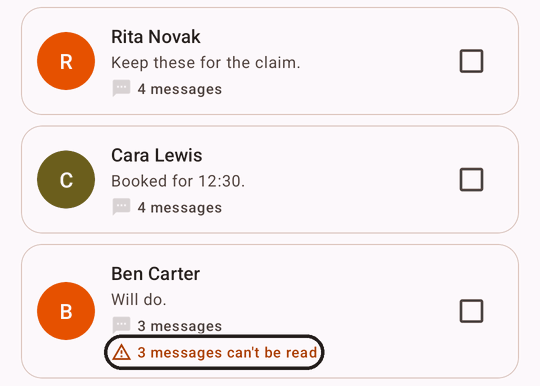
The count can include messages that failed to send, which no backup includes either. A conversation where every message is encrypted cannot be counted at all, because Android hides the whole conversation. So no warning does not guarantee nothing is missing. If a conversation you expect is not in the list at all, turn on Include encrypted chats anyway. If nothing was hidden, the app tells you, and you can switch straight back.
To include them, open Settings, turn on Include encrypted chats, read the prompt, tap Continue and choose SMS Backup as your default SMS app.
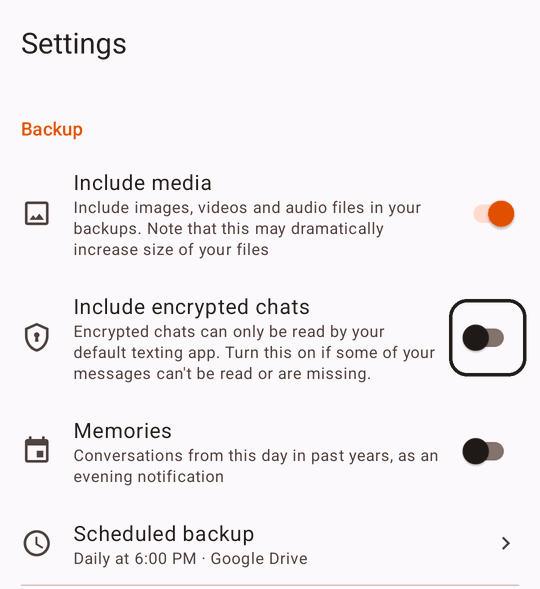
When you return to the app, it reloads your conversations and reports what it found, including conversations that had been hidden from the list entirely. If it finds nothing encrypted, it says so, and you can switch straight back.
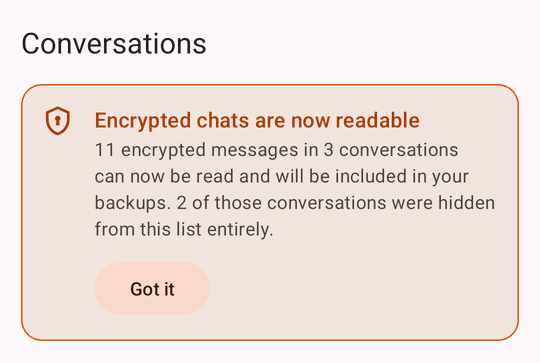
Now select the conversations and export them as usual. When the export has finished, turn Include encrypted chats off, tap Open settings and choose Messages as your default SMS app again.
Exporting to PDF, HTML or text is free. Get SMS Backup & Export to PDF on Google Play.
In other apps
Any backup app that can be set as the default SMS app can do the same. If the app has no built-in option, open your phone’s Settings › Apps › Default apps › SMS app, choose the backup app, run the backup, then choose Messages again. Menu names vary by phone.
SMS Backup & Restore also offers a clean-up tool that removes the restricted mark from messages already on your phone, so its scheduled backups can include them later. That is a real advantage if you depend on automatic backups, but know the trade-off. In our tests on Android 17, the mark cannot be put back once it is removed, so those messages become readable by every app you have given SMS access, for good. Messages that arrive later are restricted again.
If the messages are for court
A one-sided record is the worst outcome here. It looks complete, and a reader has no reason to suspect that half the conversation is missing. Before you hand over an export, compare it with the conversation in Google Messages, and check that both sides are there.
SMS Backup’s Legal export states on its cover page whether encrypted chats could be read. Exported without the switch, the cover says so plainly:
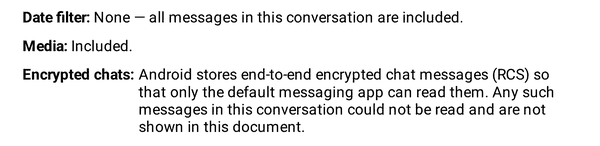
Exported while SMS Backup is the default app, the same line records that encrypted chats were readable for the export. The court printing guide covers the rest of what to check before you share the messages.
Will Google fix it?
Not so far. Google closed the original report as intended behavior. A separate feature request asks for a way to back up encrypted chats with the user’s consent and no default-app switch. It has no public answer yet. Until something changes, the default-app switch is the only way for a backup app to include encrypted chats, in any app.
Questions
Are my messages deleted?
No. They are still on your phone and in Google Messages. Only other apps are prevented from reading them.
Will turning off encryption or RCS help?
Only for new messages. Google Messages has no switch for encryption alone. Turning off RCS chats sends new messages as ordinary SMS and MMS, which backup apps can read, but it loses RCS features and encryption, and it does not change messages already on your phone.
Does this affect Samsung phones?
If your Samsung phone uses Google Messages, yes. Samsung Messages stores its own chat messages separately, and SMS Backup reads those on most Samsung phones.
Why do only the other person’s messages show up?
Because the restriction is set per message, a conversation can end up with only some of its messages readable. In the report to Google, a backup app developer found that outgoing messages went missing on some phones and not on others. If the missing messages are encrypted, including encrypted chats with the default-app switch brings them back.
Do I need Premium to include encrypted chats?
No. Include encrypted chats is free, and so are PDF, HTML and text exports. Premium adds formats such as the Legal export and CSV, scheduled backups, and removes ads.
SMS Backup for Android
See what your backup is missing
SMS Backup marks conversations with messages it can’t read, and includes encrypted chats when you ask it to. Exports are free.